A NovaStar multimedia player is the small control box that turns an ordinary LED panel into a self-contained digital sign. The Taurus range – TB1-4G, TB2-4G, TB30, TB40, TB50 and TB60 – covers everything from a single shop-front screen to a nationwide network of billboards. Every NovaStar multimedia player plays video, images and audio from internal storage, drives the cabinets over Gigabit Ethernet, and is managed from a phone, a laptop or the cloud.
It covers model selection, pixel capacity, the default password, setup, and where to download the official manuals and firmware.
1. What Is a NovaStar Multimedia Player?
A NovaStar multimedia player is a playback and display-control device built for LED screens rather than LCD monitors. One chassis does three jobs that used to need three boxes: it stores and plays your content, converts it into the signal an LED cabinet understands, and publishes new material over a network or the cloud.
Because it drives the receiving cards directly over Gigabit Ethernet, most projects need no separate sending card or permanently connected PC. That is why a NovaStar multimedia player is now the default choice for shop-front signs, lamp-post screens, conference walls and rental stages.
01 The Taurus Models in the NovaStar Multimedia Player Range
The Taurus family splits into three groups. The pocket-sized TB1-4G and TB2-4G cover single screens and USB playback. The TB30 and TB40 add dual Gigabit outputs, sensor support and a higher pixel ceiling. The TB50 and TB60 handle 4K sources and synchronised multi-screen work. All six share 1 GB of RAM, 32 GB of storage, an IP20 rating and a -20 to +60 degrees C range.
02 How a NovaStar Multimedia Player Drives an LED Screen
When you publish a program, the player stores it, decodes it, scales it to the pixel dimensions you configured, then streams it out of its LED OUT ports as a Gigabit Ethernet signal. Receiving cards in the cabinets pick that stream up in daisy-chain order, so how many cabinets one port can feed depends on its loading capacity.
That is why capacity is the first number to compare. A NovaStar multimedia player rated at 650,000 pixels drives a 2.5 mm pitch wall of about 6 square metres, while the TB60 at 2,300,000 pixels can feed several walls at once. Cable length, cabinet count and refresh rate all reduce the practical figure, so plan with headroom.
03 Why Projects Choose a NovaStar Multimedia Player
Three benefits come up again and again:
- No PC required. Publish once and the screen keeps playing, even when the network drops.
- Cluster control. One NovaStar multimedia player per screen, managed as a group, lets a retail chain push one campaign everywhere from one dashboard.
- Smarter brightness. A sensor connector tracks ambient light, so a shop window stays readable at midday and comfortable at night.
2. NovaStar Multimedia Player Models Compared
01 Full Specification Comparison
Every figure below comes from the published NovaStar specification sheet for each NovaStar multimedia player.
| Model | Loading Capacity | Max Output Resolution | Gigabit Outputs | HDMI | Net Weight |
|---|---|---|---|---|---|
| TB1-4G | 650,000 pixels | 1920 x 1080 | 1 | – | 301.8 g |
| TB2-4G | 650,000 pixels | 1920 x 1080 | 1 | 1 x HDMI 1.3 IN | 304.5 g |
| TB30 | 650,000 pixels | 4096 x 4096 | 2 (1 primary + 1 backup) | – | 1228.9 g |
| TB40 | 1,300,000 pixels | 4096 x 4096 | 2 (both primary) | 1.3 IN + OUT, loop | 430.0 g |
| TB50 | 1,300,000 pixels | 4096 x 4096 | 2 (both primary) | 1.3 IN + OUT, loop | 1234.0 g |
| TB60 | 2,300,000 pixels | 4096 x 4096 | 4 (or 2 + 2 backup) | 1.4 IN + OUT, loop | 1230.4 g |
02 Loading Capacity, Resolution and Video Playback
The second table adds playback capacity and network behaviour for the same six players.
| Model | Video Playback | USB | Network Priority |
|---|---|---|---|
| TB1-4G | 1x 1080p, 2x 720p, 4x 480p, 4x 360p | USB 2.0 Type A | Wired > 4G |
| TB2-4G | 1x 1080p, 2x 720p, 4x 480p, 4x 360p | USB 2.0 Type A | Wired > 4G |
| TB30 | 2x 4K, 6x 1080p, 10x 720p, 20x 360p | USB 3.0 Type A | Wired > Wi-Fi > 4G |
| TB40 | 1x 4K, 2x 1080p, 4x 720p, 4x 480p, 6x 360p | USB 3.0 Type A | Wired > Wi-Fi > 4G |
| TB50 | 2x 4K, 6x 1080p, 10x 720p, 20x 360p | USB 3.0 Type A | Wired > Wi-Fi > 4G |
| TB60 | 2x 4K, 6x 1080p, 10x 720p, 20x 360p | USB 3.0 Type A | Wired > Wi-Fi > 4G |
Two details are easy to misread. The TB1-4G and TB2-4G stop at a 1920 x 1080 output canvas, so they suit single screens at 1080p scale rather than tall or ultra-wide walls. And no Taurus NovaStar multimedia player ships with a 4G module.
03 How to Choose the Right NovaStar Multimedia Player
Work backwards from the screen. Count the pixels on the wall, then add 20 per cent headroom. Under 650,000 pixels with stored playback only, a TB1-4G is enough; choose the TB2-4G if you also want a live HDMI source. Above that, the TB30 and TB40 double the capacity and add sensor and GPS support. For 4K material, tight synchronisation or walls beyond 1.3 million pixels, the right NovaStar multimedia player is the TB50 or TB60.
3. TB1-4G: The Entry-Level NovaStar Multimedia Player
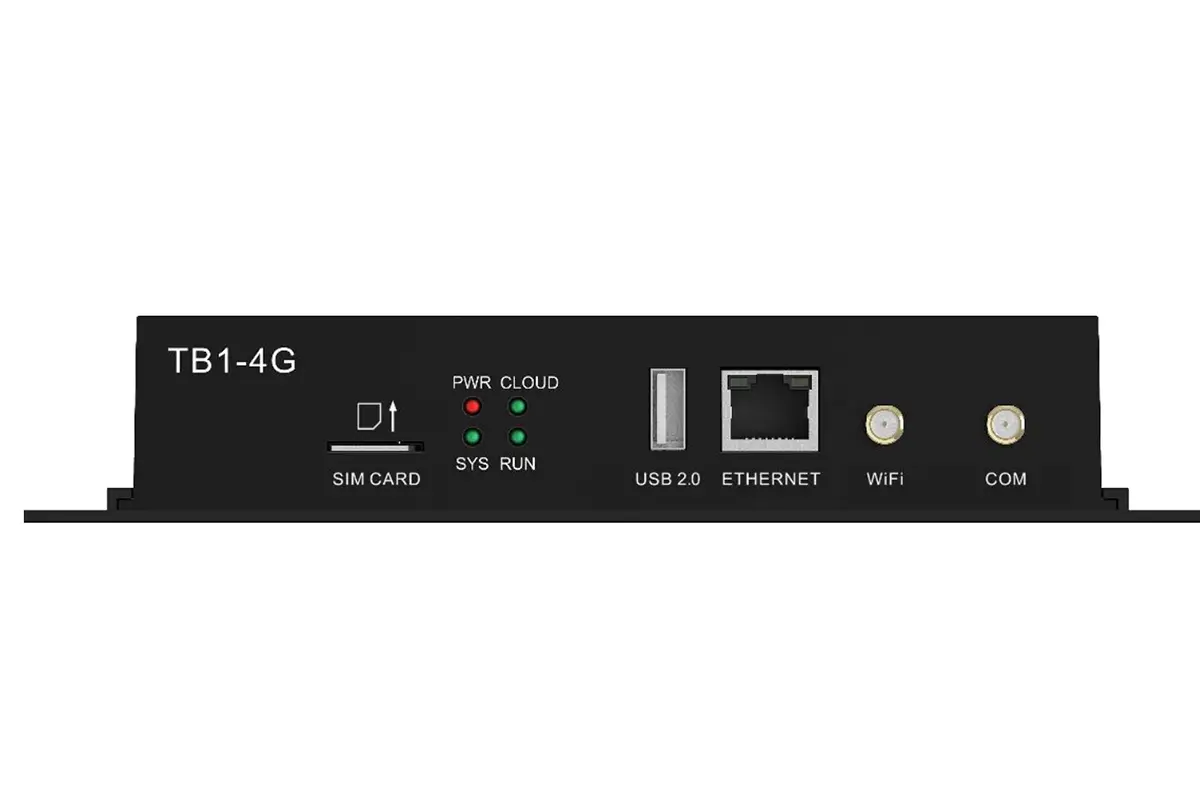
The TB1-4G is the lightest NovaStar multimedia player in the range at 301.8 g, built for asynchronous playback with the program stored and looped locally. It draws 18 W from a 12 V 2 A input, so it can share a supply with the cabinet electronics, and it suits lamp-post signs and mobile LED screens.
01 TB1-4G Appearance
NovaStar TB1-4G Front Panel
NovaStar TB1-4G Rear Panel
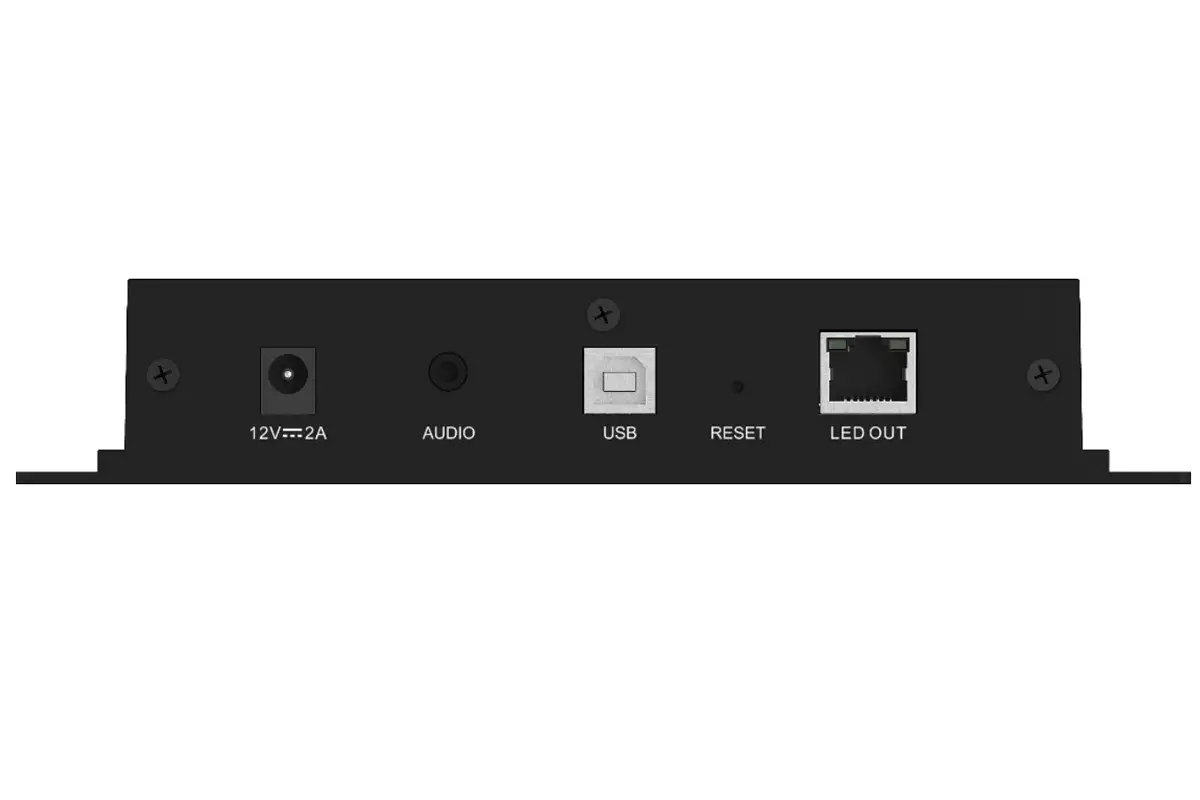
02 TB1-4G Interfaces and Specifications
| Interface | Panel | Description |
|---|---|---|
| SIM CARD | Front | SIM card slot. |
| USB 2.0 (Type A) | Front | USB playback and storage. |
| ETHERNET | Front | 100 Mbps network or PC link. |
| WiFi | Front | 2.4 GHz antenna, AP or STA. |
| COM | Front | 4G antenna connector. |
| 12V 2A | Rear | DC power input. |
| AUDIO | Rear | OMTP headset output. |
| USB (Type B) | Rear | Service port for a PC. |
| RESET | Rear | Factory reset, hold 5 seconds. |
| LED OUT | Rear | Gigabit output to the cabinets. |
Images can be JPEG, BMP, GIF, PNG or WEBP; video MP4, MOV, AVI, TS or MKV; audio MP3 or WAV. Wired always beats 4G. This NovaStar multimedia player has no HDMI input, so it cannot mirror a live source.
4. TB2-4G: HDMI Input in a Pocket-Sized NovaStar Multimedia Player
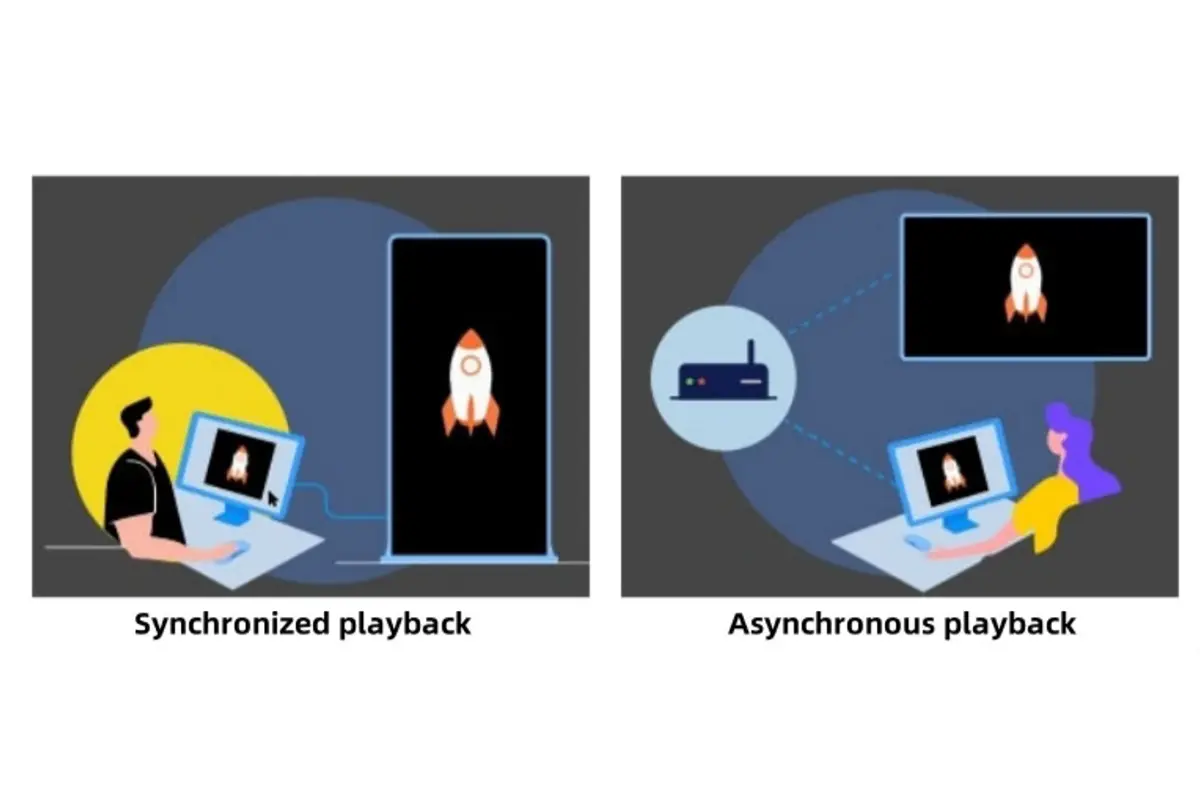
The TB2-4G shares the 650,000 pixel ceiling and 304.5 g body of the TB1-4G but adds an HDMI 1.3 input. With a live source attached, this NovaStar multimedia player switches to synchronous mode and mirrors a laptop, camera or switcher with no visible delay – the usual setup for live events, control rooms and studios.
01 TB2-4G Appearance
NovaStar TB2-4G Synchronous and Asynchronous Dual Mode
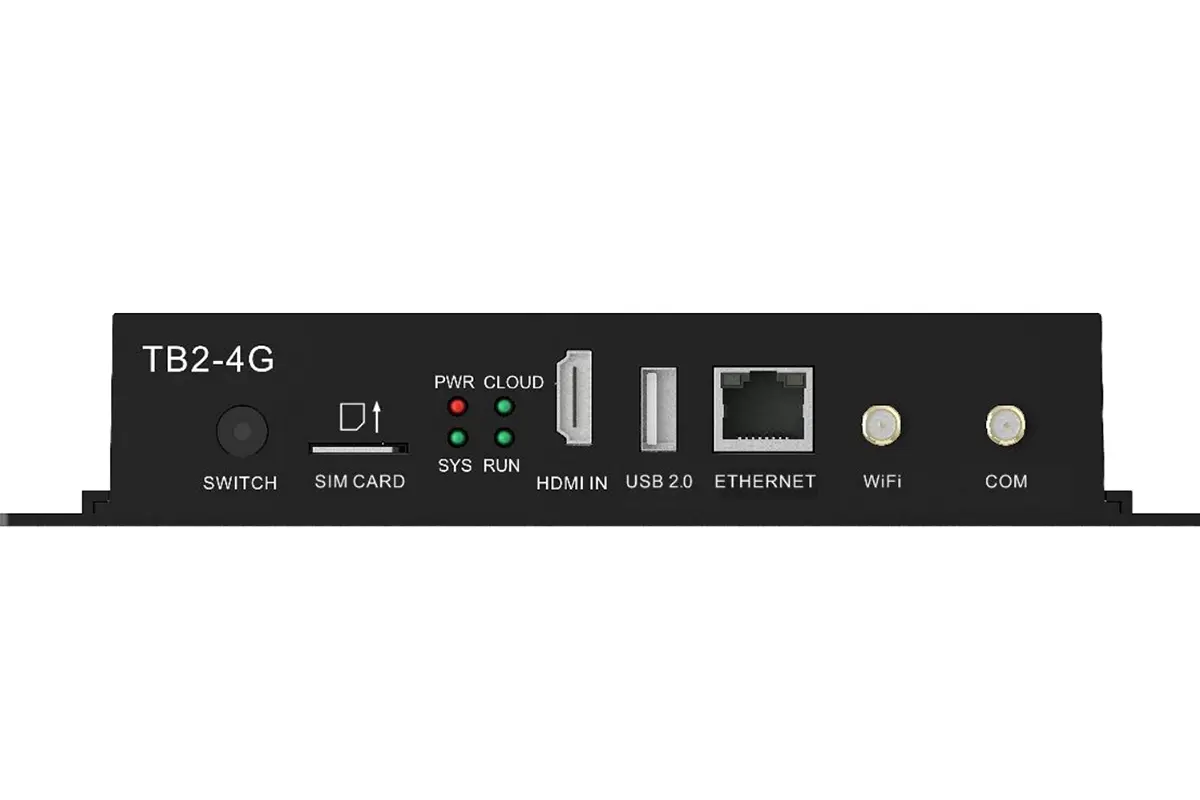
NovaStar TB2-4G Front Panel
NovaStar TB2-4G Rear Panel
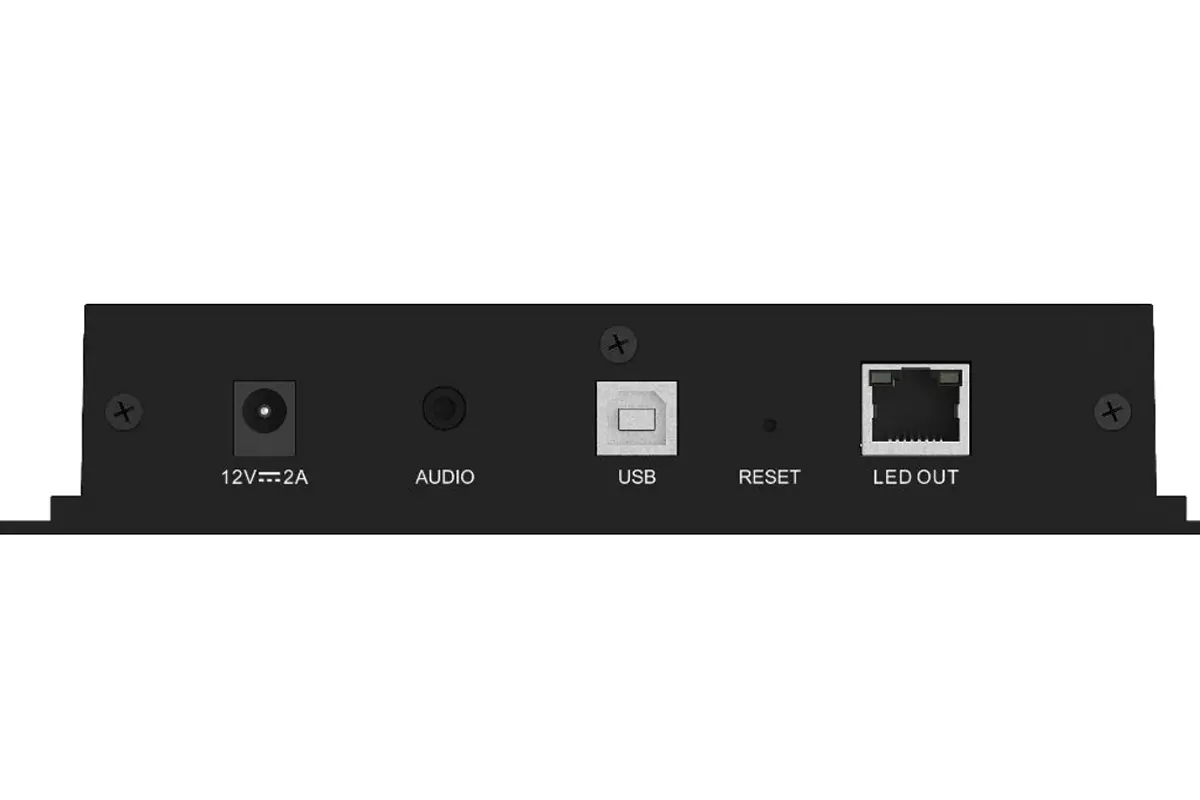
02 TB2-4G Interfaces and Specifications
| Interface | Panel | Description |
|---|---|---|
| SWITCH | Front | Sync and async mode button. |
| SIM CARD | Front | SIM card slot. |
| HDMI IN | Front | HDMI 1.3 in for synchronous playback; accepts a source 64 to 2048 pixels wide and only scales down. |
| USB 2.0 (Type A) | Front | USB playback and storage. |
| ETHERNET | Front | 100 Mbps network or PC link. |
| WiFi | Front | 2.4 GHz antenna, AP or STA. |
| COM | Front | 4G antenna connector. |
| 12V 2A | Rear | DC power input. |
| AUDIO | Rear | OMTP headset output. |
| USB (Type B) | Rear | Service port for a PC. |
| RESET | Rear | Factory reset, hold 5 seconds. |
| LED OUT | Rear | Gigabit output to the cabinets. |
Formats match the TB1-4G. The difference is the switch: leave it off and the TB2-4G is a USB-driven NovaStar multimedia player; switch it on with HDMI connected and the screen becomes a live display.
5. TB30: The Dual-Ethernet NovaStar Multimedia Player
The TB30 stops being a simple media box. It plays content and also acts as the display controller, converting that content into the signal an LED cabinet recognises. In many installations that removes the need for a separate sending card. This NovaStar multimedia player takes AC mains directly, so no external 12 V supply is needed.
01 TB30 Appearance
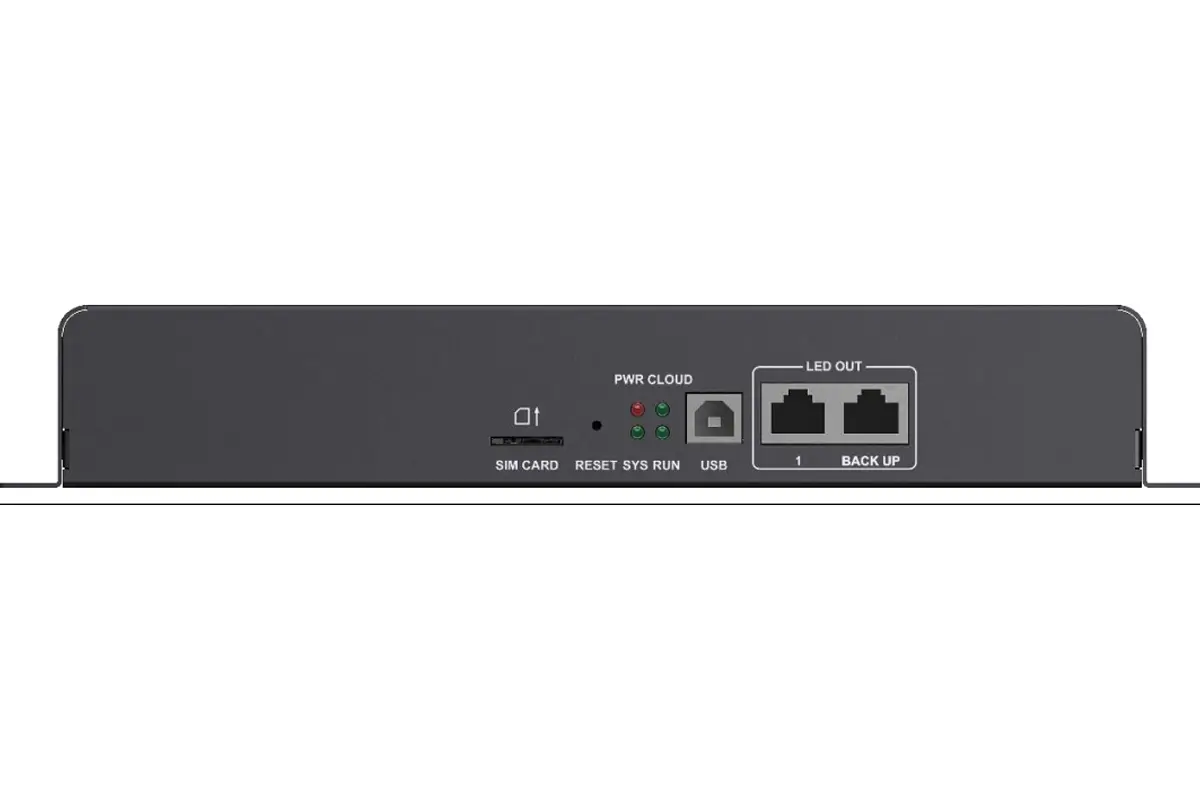
NovaStar TB30 Front Panel
NovaStar TB30 Rear Panel
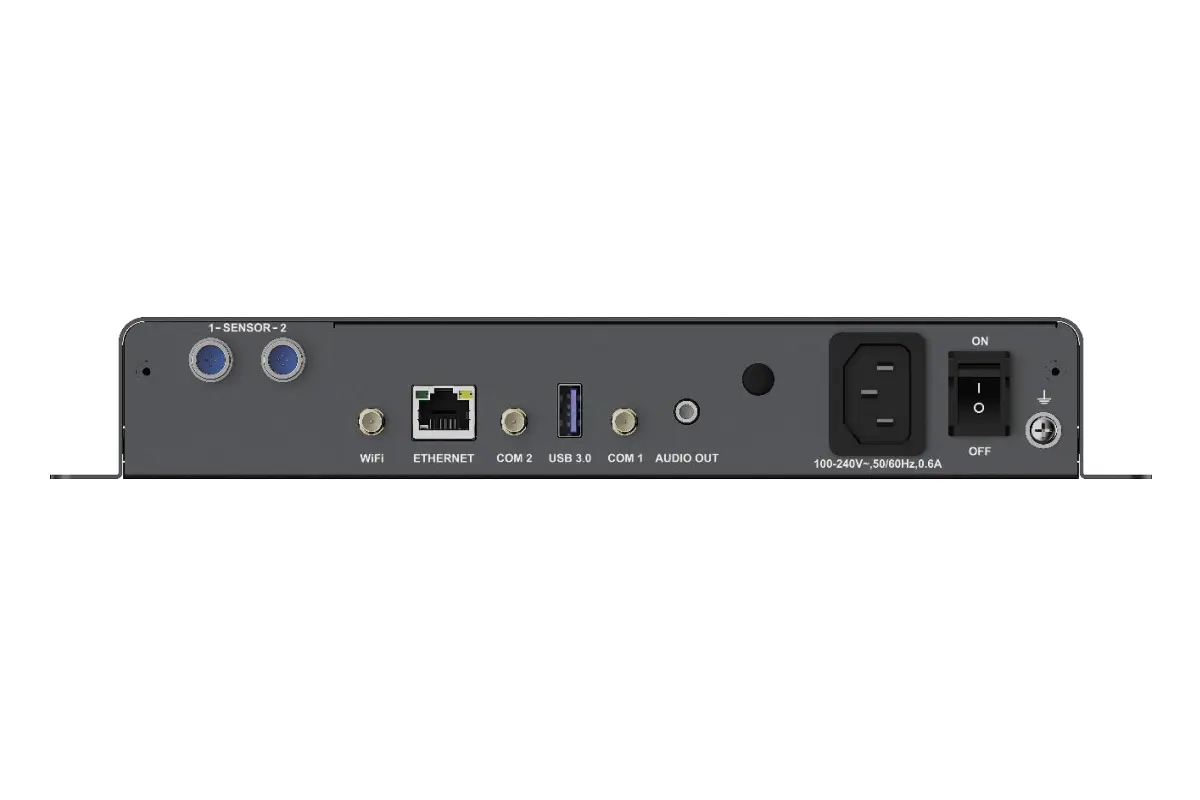
02 TB30 Interfaces and Specifications
| Interface | Panel | Description |
|---|---|---|
| SIM CARD | Front | SIM card slot. |
| RESET | Front | Factory reset, hold 5 seconds. |
| USB (Type B) | Front | Service port for a PC. |
| LED OUT | Front | Gigabit LED output. |
| SENSOR | Rear | Brightness or temperature and humidity sensor. |
| RF | Rear | RF antenna connector (reserved). |
| WiFi | Rear | 2.4 GHz antenna, AP or STA mode. |
| ETHERNET | Rear | Gigabit port for a PC, LAN or the internet. |
| COM 2 | Rear | GPS antenna connector. |
| USB 3.0 | Rear | USB playback, firmware update and storage. |
| COM 1 | Rear | 4G antenna connector. |
| AUDIO OUT | Rear | OMTP headset output. |
| 100-240V, 50/60Hz | Rear | AC power input. |
| ON/OFF | Rear | Power switch. |
The TB30 has 2 Gigabit outputs, one primary and one backup, and decodes up to 2 x 4K, 6 x 1080p, 10 x 720p or 20 x 360p feeds. Because it supports GPS time synchronisation, this NovaStar multimedia player suits screens that must stay in step across different sites.
6. TB40: The Compact NovaStar Multimedia Player with HDMI
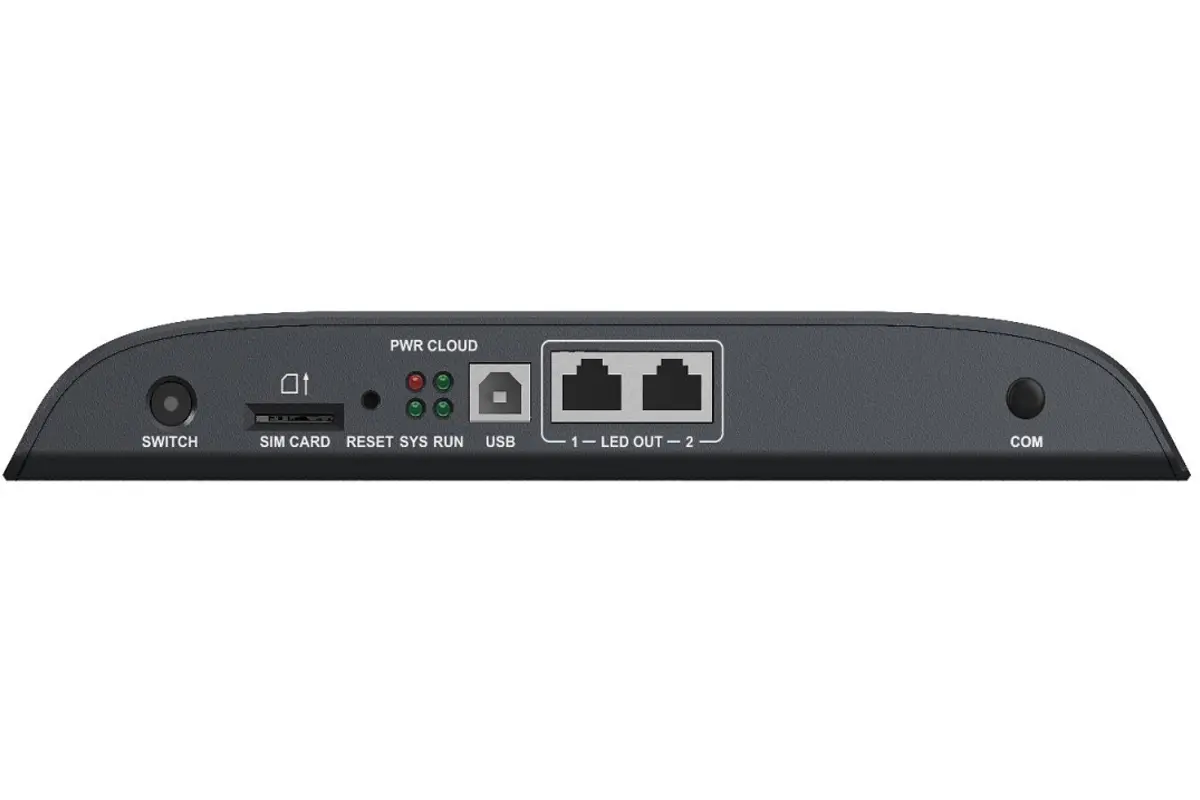
The TB40 doubles capacity to 1,300,000 pixels and adds HDMI input with loop-through, yet weighs only 430 g and runs from 12 V DC. This NovaStar multimedia player is usually the most cost-effective answer for one wall that needs both stored playback and a live feed.
01 TB40 Appearance
NovaStar TB40 Front Panel
NovaStar TB40 Rear Panel
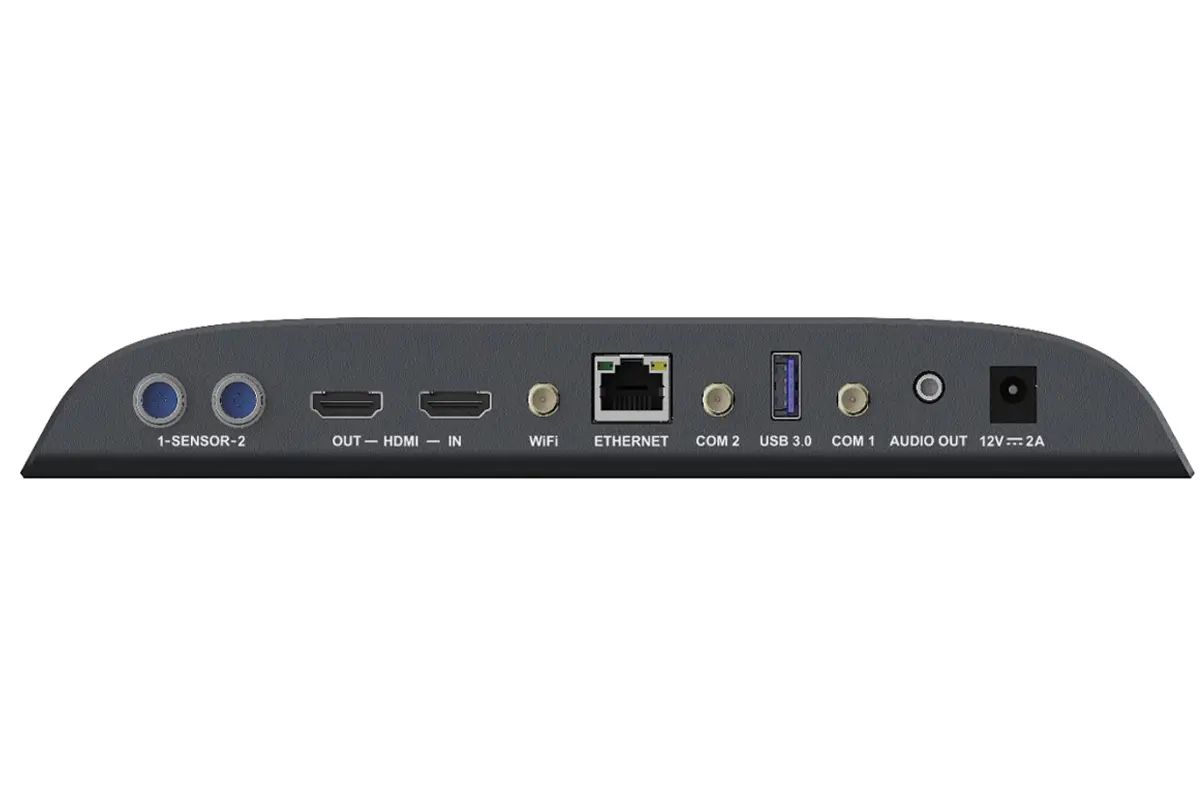
02 TB40 Interfaces and Specifications
| Interface | Panel | Description |
|---|---|---|
| SWITCH | Front | Sync and async mode button. |
| SIM CARD | Front | SIM card slot. |
| RESET | Front | Factory reset, hold 5 seconds. |
| USB (Type B) | Front | Service port for a PC. |
| LED OUT | Front | Gigabit LED output. |
| COM | Front | RF antenna connector (reserved). |
| SENSOR | Rear | Brightness or temperature and humidity sensor. |
| HDMI | Rear | 1.3 OUT with loop-through; 1.3 IN for synchronous mode, up to 1920 x 1200 at 60 Hz. |
| WiFi | Rear | Wi-Fi antenna, AP or STA mode. |
| ETHERNET | Rear | Gigabit port for a PC, LAN or the internet. |
| COM 2 | Rear | GPS antenna connector. |
| USB 3.0 | Rear | USB playback, firmware update and storage. |
| COM 1 | Rear | 4G antenna connector. |
| AUDIO OUT | Rear | OMTP headset output. |
| 12V 2A | Rear | DC power input. |
It decodes 1 x 4K, 2 x 1080p, 4 x 720p, 4 x 480p or 6 x 360p streams and drives 2 full-strength Gigabit outputs rather than a primary and backup pair. The HDMI loop output feeds a monitor from the same source. With a source attached, this NovaStar multimedia player scales the incoming picture to the wall automatically.
See the dedicated NovaStar TB40 LED display player page for project examples.
7. TB50: The 4K Production NovaStar Multimedia Player
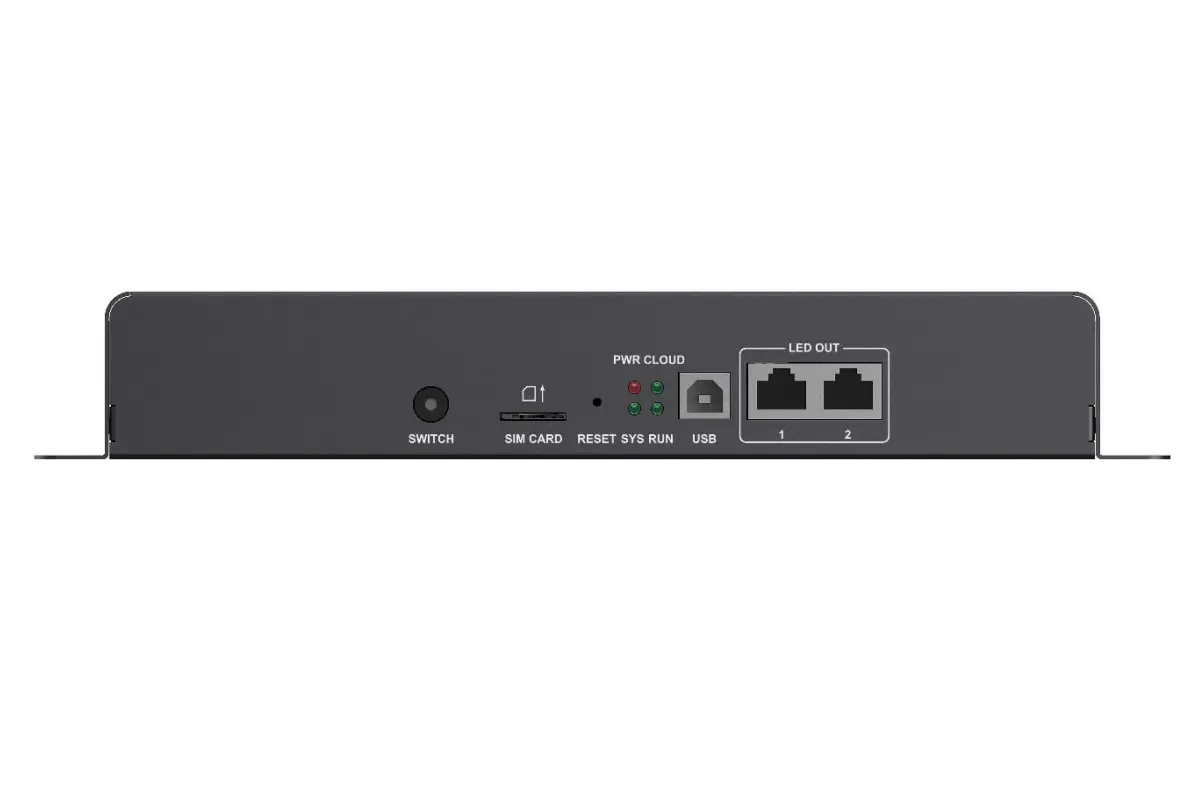
The TB50 keeps the 1,300,000 pixel capacity of the TB40 but raises decoding to 2 x 4K and returns to AC mains power. It also carries 2 sensor connectors and accepts custom HDMI resolutions, which suits ultra-wide or unusual canvases. This NovaStar multimedia player is the usual pick for rental and production work.
01 TB50 Appearance
NovaStar TB50 Front Panel
NovaStar TB50 Rear Panel
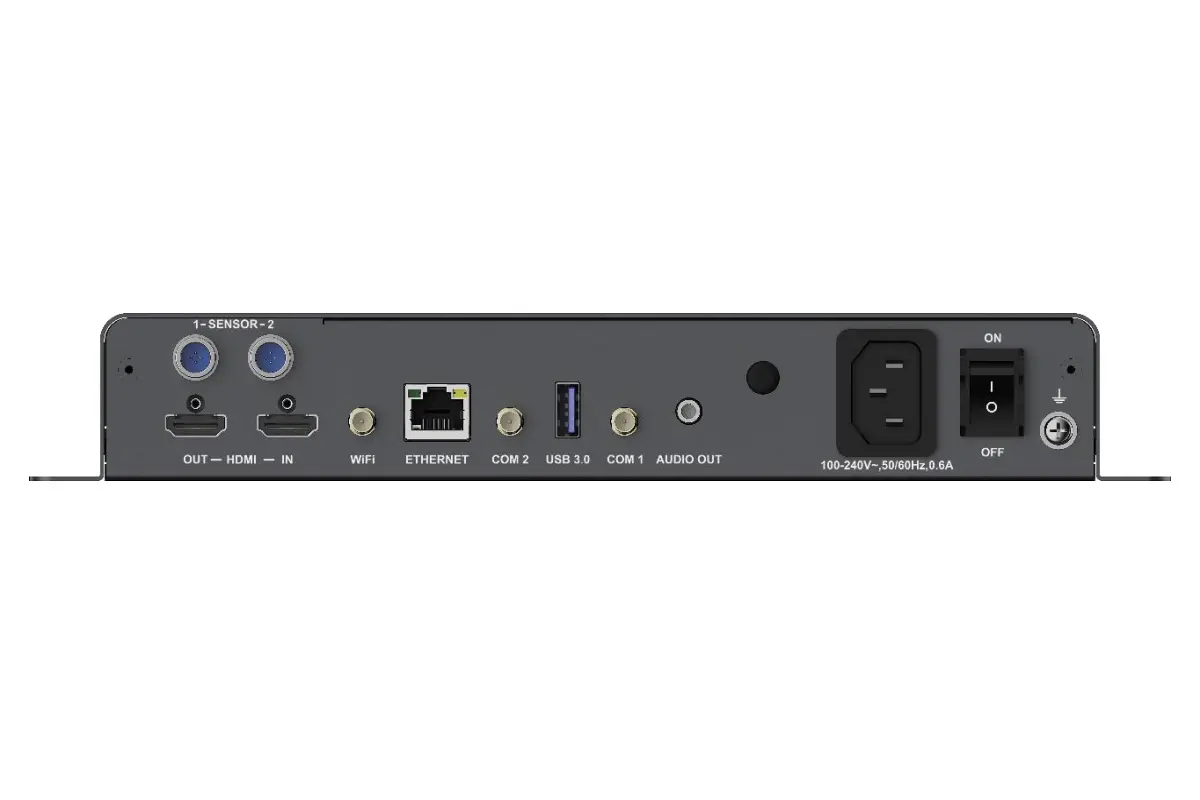
02 TB50 Interfaces and Specifications
| Interface | Panel | Description |
|---|---|---|
| SWITCH | Front | Sync and async mode button. |
| SIM CARD | Front | SIM card slot. |
| RESET | Front | Factory reset, hold 5 seconds. |
| USB (Type B) | Front | Service port for a PC. |
| LED OUT | Front | Gigabit LED output. |
| SENSOR | Rear | 2 sensor connectors. |
| HDMI | Rear | 1.3 OUT with loop-through; 1.3 IN for synchronous mode, up to 1920 x 1200 at 60 Hz. |
| WiFi | Rear | Wi-Fi antenna, AP or STA mode. |
| ETHERNET | Rear | Gigabit port for a PC, LAN or the internet. |
| COM 2 | Rear | GPS antenna connector. |
| USB 3.0 | Rear | USB playback, firmware update and storage. |
| COM 1 | Rear | 4G antenna connector. |
| AUDIO OUT | Rear | OMTP headset output. |
| 100-240V, 50/60Hz | Rear | AC power input. |
Both Gigabit outputs run as primary ports, and priority is wired, then Wi-Fi, then 4G. In synchronous mode with full-screen scaling, the source must be between 512 and 2048 pixels in both directions and is only ever scaled down. Check that before you mount this NovaStar multimedia player.
8. TB60: The Flagship NovaStar Multimedia Player
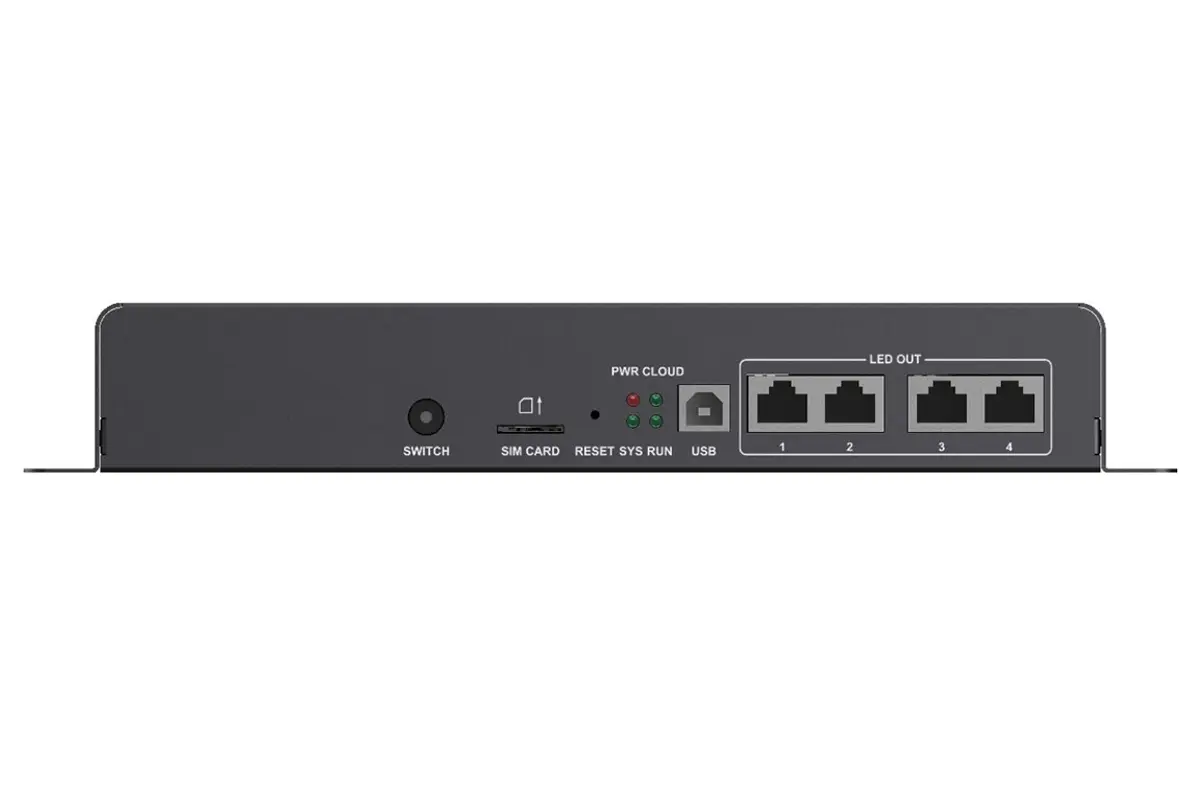
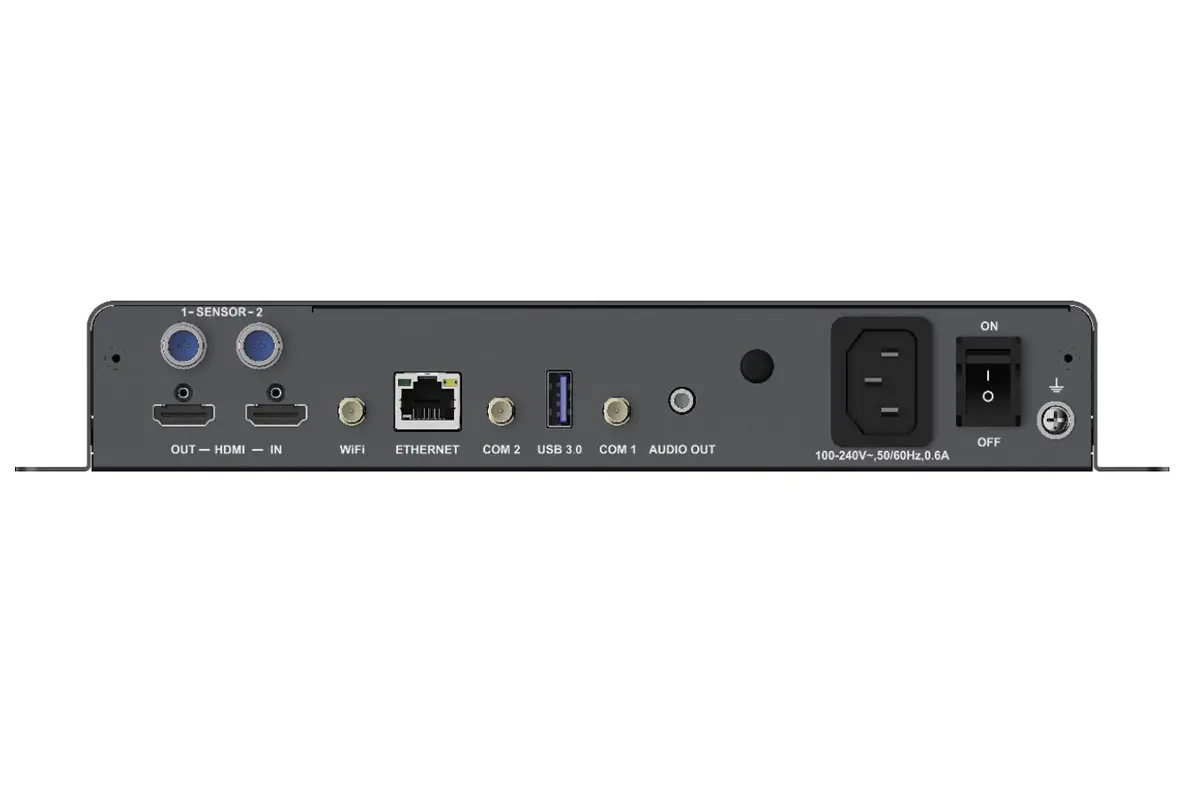
The TB60 is the top of the range: 4 Gigabit output ports, up to 2,300,000 pixels, a quad-core ARM A55 processor with H.264 and H.265 4K at 60 Hz decoding, HDMI 1.4 and Android 11. This NovaStar multimedia player is built for large walls, multi-screen synchronisation and smart-city work.
01 TB60 Appearance
NovaStar TB60 Front Panel
NovaStar TB60 Rear Panel
02 TB60 Interfaces and Specifications
| Interface | Panel | Description |
|---|---|---|
| SWITCH | Front | Sync and async mode button. |
| SIM CARD | Front | SIM card slot. |
| RESET | Front | Factory reset, hold 5 seconds. |
| USB (Type B) | Front | Service port for a PC. |
| LED OUT | Front | 4 Gigabit LED outputs, all primary by default. |
| SENSOR | Rear | 2 sensor connectors. |
| RF | Rear | RF antenna connector for time synchronisation. |
| HDMI | Rear | 1.4 OUT with loop-through; 1.4 IN for synchronous mode, maximum 1080p at 60 Hz. |
| WiFi | Rear | Wi-Fi antenna, AP or STA mode. |
| ETHERNET | Rear | Gigabit port for a PC, LAN or the internet. |
| COM 2 | Rear | GPS antenna connector. |
| USB 3.0 | Rear | USB playback and firmware upgrade. |
| COM 1 | Rear | 4G antenna connector. |
| AUDIO OUT | Rear | Stereo output, internal source fixed at 48 kHz. |
| 100-240V, 50/60Hz | Rear | AC power input. |
| ON/OFF | Rear | Power switch. |
Time synchronisation defines the TB60: it can hold screens together through NTP, GPS or RF, so displays on separate buildings stay frame-accurate. GPS and RF both need the specified module fitted, and none is supplied. Front-panel LEDs report status directly, so a technician can see whether this NovaStar multimedia player is online, upgrading or simply loading video.
9. NovaStar Multimedia Player Default Password and Login
Password questions are the most common support request for this family, and the answer is the same across the range: there is no universal factory password. Every NovaStar multimedia player gets a unique Wi-Fi AP name and password at the factory, and both are printed on the label carrying the serial number.
01 Default SSID, Password and Priority by Model
| Model | Default SSID | Default Password | Network Priority |
|---|---|---|---|
| TB1-4G | AP + last 8 digits of SN | Printed on the SSID label | Wired > 4G |
| TB2-4G | AP + last 8 digits of SN | Printed on the SSID label | Wired > 4G |
| TB30 | AP + last 8 digits of SN | Printed on the SSID label | Wired > Wi-Fi > 4G |
| TB40 | AP + last 8 digits of SN | Printed on the SSID label | Wired > Wi-Fi > 4G |
| TB50 | AP + last 8 digits of SN | Printed on the SSID label | Wired > Wi-Fi > 4G |
| TB60 | AP + last 8 digits of SN | Printed on the SSID label | Wired > Wi-Fi > 4G |
02 What to Do If the Password Does Not Work
Work through these checks in order:
- Confirm you are joining the SSID that starts with AP, and that its last eight characters match the last eight digits of the serial number.
- Type the password exactly as printed. Characters such as 0 and O or 1 and l are easy to confuse.
- Forget the network and join it again rather than reusing a saved credential.
- If the label is damaged, hold RESET for 5 seconds. The Wi-Fi AP password reverts to the value on the SSID label.
- If the access point still refuses that password, contact your supplier with the serial number instead of guessing.
Once you are in, change the Wi-Fi AP password and the web login on your own NovaStar multimedia player as part of commissioning, so no default is left in place on a public site.
10. How to Set Up a NovaStar Multimedia Player
01 Step-by-Step Setup
The sequence below works for every model in the range.
- Mount the unit. Fix the player inside the cabinet with the supplied brackets, leaving room for the antennae.
- Connect the LED outputs. Run Cat5e or Cat6 from LED OUT to the first receiving card, then daisy-chain. Never loop the last cabinet back to the player.
- Connect the network. Use ETHERNET for permanent installations, or Wi-Fi AP mode or a 4G module where no cable reaches.
- Power the unit. The TB1-4G, TB2-4G, TB40 and TB50 need 12 V DC at 2 A; the TB30 and TB60 take AC mains at 100-240 V.
- Join the device. Install ViPlex Handy, connect to the default SSID and enter the password from the SSID label.
- Describe the screen. Enter the cabinet size, the receiving card type, the cabinet count and the data flow order.
- Publish a test pattern first, then send the final content.
02 Network Options and Priority
When more than one connection exists, the device chooses automatically.
| Connection | Best Suited To | What You Need | Priority |
|---|---|---|---|
| Wired Ethernet | Permanent installs | Cat5e or Cat6 to a switch | Highest |
| Wi-Fi AP mode | First-time setup | A phone within range of the hotspot | Second |
| Wi-Fi STA mode | Indoor sites with coverage | A local router SSID and password | Second |
| 4G network | Lamp posts and billboards | A 4G module and an active SIM | Lowest |
03 Synchronous and Asynchronous Playback
Asynchronous mode is the default: the stored program loops, and the screen keeps running whether or not the network is up. Synchronous mode takes the picture from the HDMI input instead, so the wall mirrors a laptop, camera or switcher in real time. A NovaStar multimedia player without an HDMI port, such as the TB1-4G, cannot run synchronously. On the TB2-4G the mode is set with the front-panel SWITCH; on the TB30 to TB60 it lives in the software.
04 Refresh Rate, Scaling and Synchronisation
Refresh rate matters most on camera: for broadcast work, raise it until banding disappears from the recorded image, starting around 3840 Hz. Full-screen scaling stretches the HDMI source to the wall, but only downwards. The TB2-4G accepts a source 64 to 2048 pixels wide, while the TB50 needs 512 to 2048 pixels in both directions. If several walls must stay in step, use one NovaStar multimedia player per wall and lock them together through NTP, GPS or RF time synchronisation.
11. NovaStar Multimedia Player Manuals, Firmware and Downloads
NovaStar publishes a specification sheet, a quick start guide and firmware for every model. Use the links below to download the documentation for your NovaStar multimedia player.
01 Official Manuals and Firmware
| Model | Specifications / Manual | Quick Start Guide | Firmware |
|---|---|---|---|
| TB1-4G | TB1-4G Specifications | TB1-4G Quick Start Guide | TB1-4G Firmware |
| TB2-4G | TB2-4G Manual | TB2-4G Specifications | TB2-4G Firmware |
| TB30 | TB30 Specification | TB30 Quick Start Guide | TB30 Firmware |
| TB40 | TB40 Specifications | TB40 Quick Start Guide | TB40 Firmware |
| TB50 | TB50 Specifications | TB50 User Manual | TB50 Firmware |
| TB60 | TB60 Specifications | TB60 Quick Start Guide | TB60 Firmware |
Configuration files live in a separate library: RCFG and RCFGX file download.
02 How to Update Firmware Safely
Firmware arrives as a nuzip package. Follow this order:
- Read the release notes and confirm the package covers your exact model.
- Copy the nuzip file to the root of a USB drive formatted as FAT32 or Ext4.
- Start the upgrade from ViPlex Handy or the device menu.
- Do not remove power or the drive during the upgrade, and check the version afterwards.
12. Software for Your NovaStar Multimedia Player
Three tools cover everyday work with the Taurus range. A NovaStar multimedia player runs without any of them once configured, but setup and publishing are far quicker with the right app.
01 ViPlex Handy
ViPlex Handy is the iOS and Android app and the fastest way to commission one unit. It finds the device, handles the default SSID login, sets screen parameters, publishes photos and videos from the phone, and reports status so a technician can confirm playback without opening the cabinet.
02 ViPlex Express
ViPlex Express is the Windows application for building programs. It handles multi-page playlists, schedules, screen splitting and precise scaling. Most installers use it to build a program for an advertising LED board, then leave daily updates to the mobile app. See the NovaStar ViPlex Express page for detail.
03 NovaLCT and SmartLCT
NovaLCT and SmartLCT are the maintenance tools. They work at receiving-card level, which is what you need when a cabinet is dark or the mapping must be rebuilt. On a NovaStar multimedia player installation, NovaLCT also confirms that the player is presenting itself correctly to the cards. Wall-level windowing is better served by a dedicated video wall splicer. Full-colour projects, from kinetic LED walls to full-colour LED displays, usually combine both tools.
13. FAQ: NovaStar Multimedia Player Questions
14. Conclusion
The Taurus range covers a wide span of jobs with one idea: put playback and sending in a single box so one NovaStar multimedia player can run a screen unattended. Choose by loading capacity and by whether you need a live HDMI source. Capacity runs from 650,000 pixels on the TB1-4G to 2,300,000 on the TB60, with 4K decoding at the top of the range.
Before ordering, confirm the pixel count of the wall, the power available inside the cabinet and how the site will be connected. Then download the right manual and firmware above, set the screen parameters carefully on the first visit, and change every default password before the installation goes live.
 How An Exhibition Screen Turns Heads And Steals The Show?
 2025 EagerLED Mid-Autumn Festival Holiday Notice